Release 10.7 of ZIRO Platform is planned for General Availability in May 2026
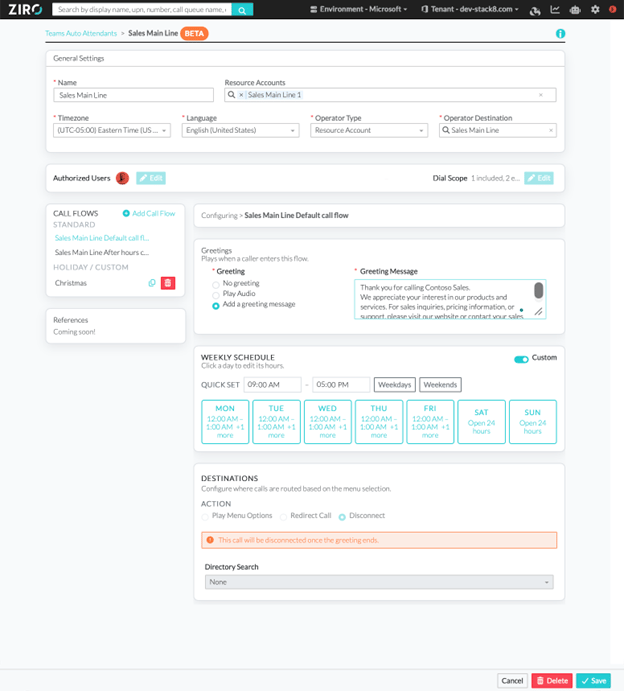
Microsoft Teams Auto Attendants Management
Administrators can now browse and view existing Microsoft Teams Auto Attendants directly within ZIRO Platform — no more switching to the Teams Admin Center just for visibility. Search for Auto Attendants, inspect their configurations, and access them from the 360 view, all in one place. This is especially valuable in migration scenarios where full visibility into Auto Attendant configurations is critical.
Note: Full create, modify, and delete capabilities are planned for a future release.
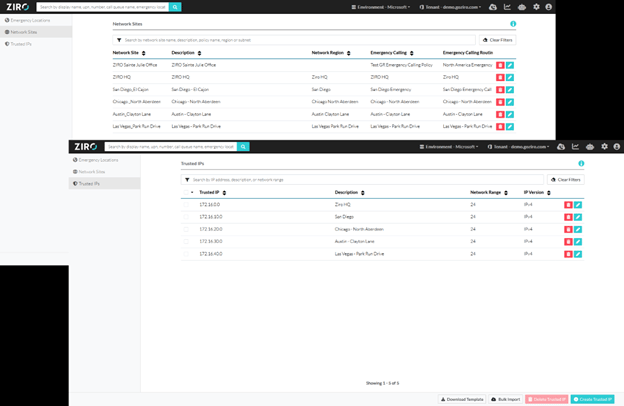
Emergency Calling - Network Sites and Trusted IPs
Building on Emergency Location Management introduced in 10.6, administrators can now manage the complete Teams emergency calling configuration without leaving ZIRO Platform. The new Emergency Calling section brings together everything needed for 911 compliance:
- Create and update Network Sites, including Region, Subnets, and associated policies
- Associate Emergency Calling and Call Routing Policies to Network Sites
- Create and remove Trusted IPs to define corporate network boundaries
This eliminates the need to split emergency calling configuration between ZIRO and the Teams Admin Center.
Bulk Management - Import/Export jobs with policies
ZIRO Platform has expanded Bulk Management to give administrators greater flexibility when handling large-scale user changes:
- Export jobs to Excel for offline editing and re-import once updated
- Export completed jobs to generate documentation for project handoffs
- Assign policies per row directly within the CSV template
- Leverage default DPG policies at runtime for consistent policy alignment
- Improved failure tracking ensures every bulk job is fully auditable
- User created through Bulk Jobs and Zero Provisioning jobs now automatically forwards calls to voicemails after 20 seconds.
Enhancements to the Unanswered Call Forwarding Settings
Based on direct administrator feedback, ZIRO Platform has improved the Unanswered Call Forwarding configuration experience. The Calling Settings tab now defaults to Voicemail after 20 seconds — the most common real-world expectation — applied consistently across Zero Touch Provisioning and bulk workflows. Unanswered call forwarding settings are also now accessible during the initial phone number assignment flow, eliminating the extra navigation step previously required.
Search page improvements
The search page has been redesigned for a cleaner, faster-feeling experience. Result sections are now organized into collapsible cards , making it easy to distinguish between entity types at a glance. A result count summary — broken down by entity type — is displayed at the top of the page, and the old spinner has been replaced with per-section loading indicators , providing clear visual feedback on what is still loading.
Other Enhancements
- Removed the ability to set a Resource Account as a Call Queue member.
Fixed Bugs
- The Resource Account creation page now lists all the valid domains in the UPN field rather than a selected few.
- Security Group searches used to be slow when using broad search terms. The search is now faster.
- Fixed an issue where the General Settings page would not load if the default tenant did not have permissions to read Teams devices.
- Fixed an issue where the Call Queue page would not load if a Call Queue was built with PowerShell.
- Fixed an out-of-memory crash issue. (10.7.1)
- Fixed an issue where administrators could create a RingCentral report before the feature is ready for primetime. (10.7.1)