Enforcing Usage Location Alignment for Phone Number Assignment
Aligning a user’s Usage Location with the regional origin of their assigned phone number is a foundational control for predictable call behavior and emergency services accuracy. When these attributes drift apart:
- Normalization becomes inconsistent
- Calls hairpin across regions, wasting media paths
- Emergency routing can land in the wrong jurisdiction
- Bulk migrations introduce mismatches at scale
The ZIRO Platform enforces this alignment at the Dial Plan Group level, using the Enforce Number Usage Location field as a regional gate for number assignment.
How Enforcement Works in ZIRO Platform
When Enforce Number Usage Location is enabled, ZIRO Platform validates the user’s Usage Location against the Dial Plan Group’s region before allowing assignment:
- Match → assignment proceeds
- Mismatch → ZIRO Platform blocks the assignment before any invalid configuration reaches Teams
Where Enforcement Comes From (By Number Type)
Microsoft enforces Usage Location alignment natively for some number types, but not for Direct Routing.
| Number Type | Enforced By | Configurable | Notes |
|---|---|---|---|
| Calling Plan | Microsoft | No | Enforced by Microsoft, not configurable in ZIRO Platform. |
| Operator Connect | Microsoft | No | Enforced by Microsoft, not configurable in ZIRO Platform. |
| Direct Routing | ZIRO Platform (optional) | Yes — per Dial Plan Group | Microsoft performs no Usage Location check. Enforcement is optional in ZIRO Platform via the Dial Plan Group’s Enforce Number Usage Location field. |
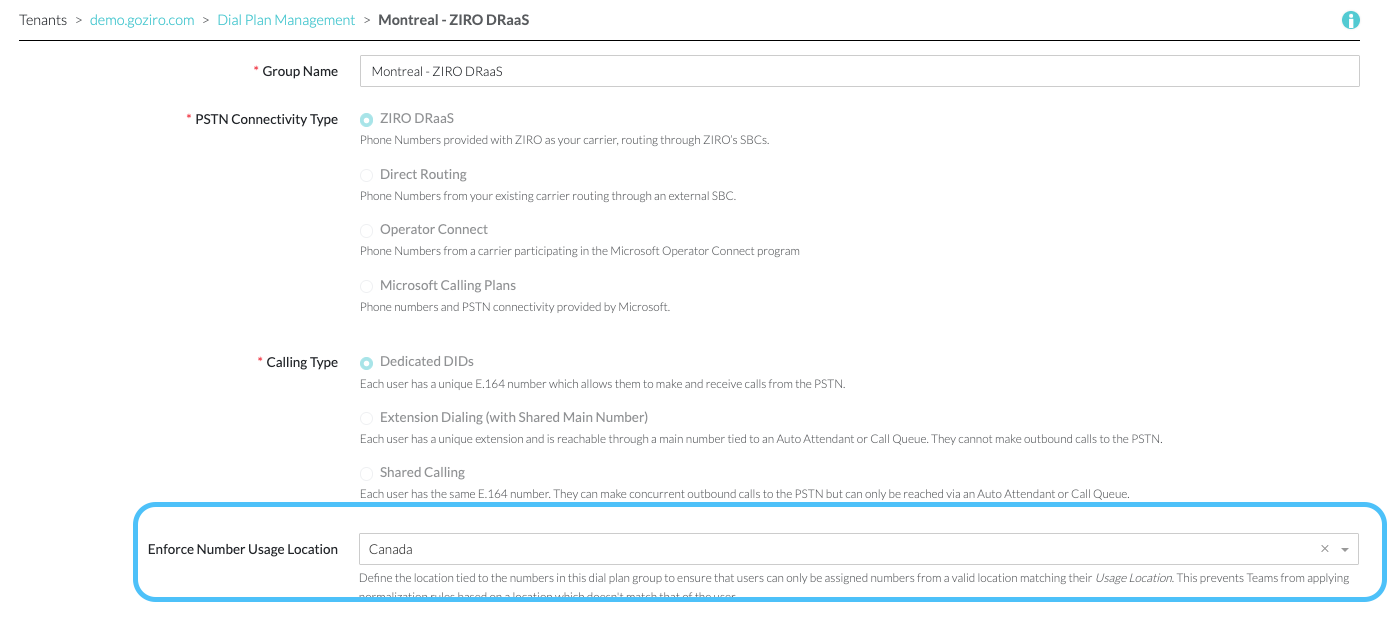
Your 360 view and Bulk Jobs will now utilize this setting to validate users Usage Locations.